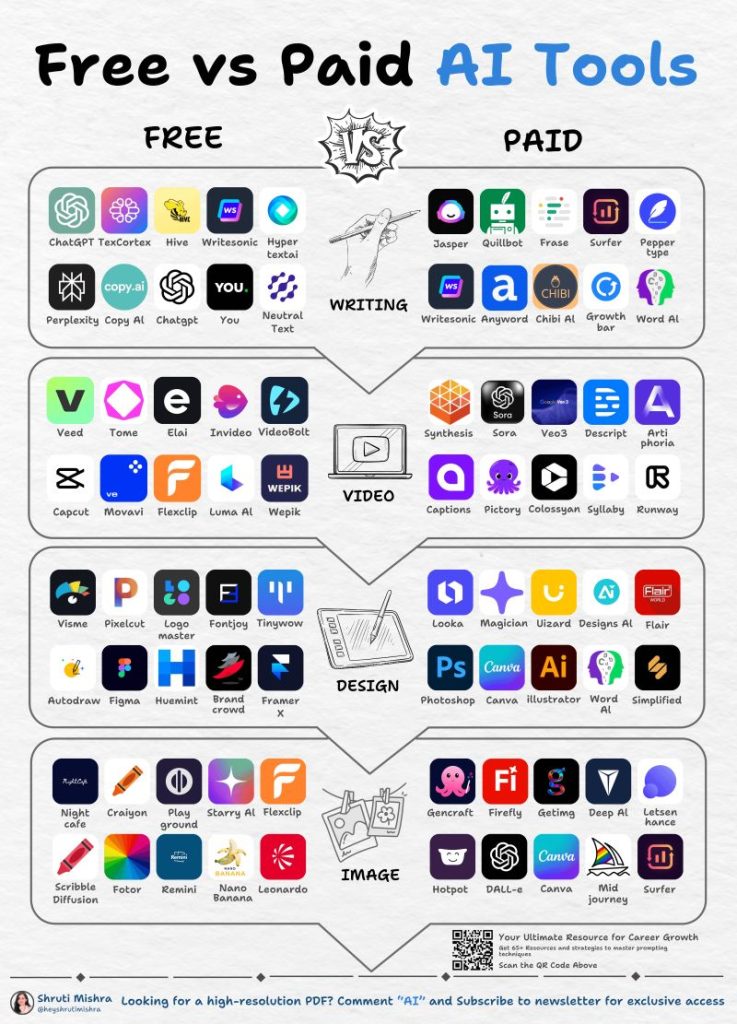

Artificial intelligence is transforming the world of graphic design. AI design tools now allow beginners, content creators, marketers, bloggers, and businesses to create professional-looking images without spending hours learning complicated design software.
From AI image generators and online graphic design platforms to AI-powered video editors, creative technology has made visual content faster and easier to produce. A simple text prompt can now become an illustration, advertisement, social media post, product image, or cinematic visual within minutes.
Whether you are searching for the best AI design tools, an AI image generator, a Canva alternative, or an easy way to create graphics online, these platforms are worth exploring.
1. Canva
Canva remains one of the most popular online graphic design tools for beginners and professionals. Its combination of templates, drag-and-drop editing, stock assets, and AI-powered features makes it suitable for almost every type of visual content.
Users can create Instagram posts, YouTube thumbnails, presentations, posters, flyers, advertisements, invitations, business graphics, and more.
Canva’s AI features can also help generate content, create images, modify designs, and speed up repetitive creative tasks.
Best for: Social media graphics, presentations, marketing materials, posters, and beginners.
2. Adobe Firefly
Adobe Firefly is an AI-powered creative platform designed for generating and editing visual content. Its text-to-image capabilities allow users to describe an idea and turn it into an AI-generated image.
Beyond image generation, Firefly can assist with creative editing, background changes, object manipulation, and other image-generation workflows.
For designers already using Adobe’s ecosystem, Firefly provides a convenient way to incorporate generative AI into graphic design.
Best for: AI image generation, creative editing, professional design workflows, and concept development.
3. ChatGPT for Design Ideas and AI Prompts
AI assistants can be useful long before the actual design process begins. Instead of opening an editor with no idea what to create, you can use AI to develop concepts, headlines, layouts, color combinations, and detailed image prompts.
For example, a business owner could ask:
“Give me five Instagram advertisement ideas for a luxury real estate company in Dubai.”
The resulting ideas can then be transformed into visual designs using an image generator or online design editor.
This makes AI particularly useful for graphic design ideas, AI prompts, marketing content, captions, and creative brainstorming.
Best for: Design concepts, AI prompts, content ideas, marketing copy, and creative planning.
4. Midjourney
Midjourney is one of the best-known platforms for AI-generated art and images. It is particularly popular among creators looking for highly detailed, artistic, imaginative, and cinematic visuals.
A detailed prompt can produce everything from futuristic cities and fantasy landscapes to product concepts and atmospheric photography.
Creative professionals can also use generated visuals as inspiration for advertisements, social media content, thumbnails, websites, and other projects.
Best for: AI art, cinematic images, concept art, fantasy visuals, and creative experimentation.
5. Leonardo AI
Leonardo AI provides powerful tools for generating images and creative assets from text prompts. The platform is particularly useful for creators who want to experiment with different visual styles and produce multiple variations of an idea.
Designers, game developers, marketers, and content creators can use AI-generated visuals for characters, illustrations, advertisements, product concepts, and social media.
Best for: AI artwork, character design, illustrations, creative assets, and visual concepts.
6. Microsoft Designer
Microsoft Designer focuses on making AI graphic design accessible to everyday users. Its tools can help create social media posts, invitations, promotional graphics, advertisements, and other visual content.
Beginners can benefit from its straightforward workflow because creating a design does not require extensive knowledge of professional graphic-design software.
Best for: Beginners, social media graphics, advertisements, invitations, and quick designs.
7. Ideogram
Ideogram has gained attention for its ability to create AI-generated images containing text. That capability makes it particularly useful for designs where typography is an important part of the visual.
Posters, advertisements, promotional graphics, logos, social media concepts, and typography-focused artwork are some of the areas where this type of AI image generation can be especially useful.
Best for: Posters, typography, advertisements, text-based graphics, and creative concepts.
8. Runway
Runway focuses heavily on AI video generation and video editing. While traditional AI image generators concentrate on still images, Runway provides tools for creators interested in producing and manipulating video content.
Social media creators, filmmakers, advertisers, and digital artists can use AI-powered video tools to experiment with visual effects, generated scenes, and creative video workflows.
Best for: AI video generation, visual effects, filmmaking, and creative video projects.
9. Figma
Figma is primarily known as a collaborative interface and product-design platform rather than a conventional AI image generator. Its powerful design environment makes it particularly useful for creating websites, mobile applications, prototypes, interfaces, and digital products.
For people working in UI/UX design, Figma provides a collaborative environment where designers can develop and refine digital experiences.
Best for: UI design, UX design, website design, app interfaces, prototypes, and collaborative projects.
10. YouDesign.live
YouDesign.live aims to bring online design tools, AI prompts, creative ideas, and visual inspiration together in one destination.
The long-term vision is to make digital design accessible to people who may not have professional graphic-design experience. Instead of requiring users to master complicated software, YouDesign can help simplify the journey from an initial idea to a finished visual.
Potential use cases include:
- Social media posts
- YouTube thumbnails
- Blog graphics
- Business advertisements
- Posters
- Flyers
- Product promotions
- AI-generated images
- Creative projects
- Digital marketing content
As YouDesign.live develops, its goal is to make the creative workflow increasingly simple:
Idea → AI Prompt → Design → Edit → Download
How to Choose the Best AI Design Tool
Choosing the right AI design tool depends on the type of content you want to create.
For social media posts, advertisements, presentations, and templates, Canva and similar online design platforms are convenient choices.
Creators interested in AI-generated artwork and realistic images may prefer platforms such as Midjourney, Leonardo AI, Adobe Firefly, or Ideogram.
Those working with AI video generation and visual effects should explore dedicated video platforms such as Runway.
Website and application designers may find Figma more suitable because it focuses on interfaces, prototypes, and digital products.
Meanwhile, anyone looking for a combination of design inspiration, AI prompts, and online creative tools can explore YouDesign.live.
Why AI Design Tools Are Becoming So Popular
Traditional graphic design often requires specialized software, technical knowledge, and considerable time. AI is changing that equation.
A person can now describe a visual concept in ordinary language and receive a usable starting point within seconds. That does not mean every generated image will be perfect, but it significantly reduces the time required to move from an idea to a visual concept.
Small businesses can create marketing materials without hiring a designer for every simple task. Bloggers can produce featured images faster. YouTubers can experiment with thumbnail concepts. Social media managers can create multiple variations of promotional content.
The result is a much faster and more accessible digital design workflow.
AI Design Does Not Replace Creativity
One common misconception is that AI eliminates creativity. In reality, the quality of an AI-generated design often depends on the quality of the idea and instructions provided by the user.
Consider the difference between these two prompts:
“Create a coffee shop.”
Compared with:
“Create a cozy modern coffee shop in Lahore at sunset, featuring warm interior lighting, wooden furniture, large windows, indoor plants, cinematic photography, realistic details, and a premium atmosphere.”
The second prompt provides much more direction.
Understanding AI prompts, composition, typography, colors, visual hierarchy, and audience preferences can therefore make a significant difference to the final result.
The Future of Online Graphic Design
The traditional design workflow has often looked like this:
Idea → Learn software → Create → Edit → Export
AI is gradually introducing a different approach:
Idea → Describe → Generate → Edit → Export
That shift does not make traditional design knowledge irrelevant. Instead, it gives ordinary users more control over the creative process.
The ability to communicate a visual idea clearly may become one of the most valuable skills in modern digital content creation.
Final Thoughts
The best AI design tools can dramatically simplify the process of creating visual content. From AI image generators and graphic design platforms to AI video editors and creative assistants, there are now more options than ever for turning ideas into professional-looking visuals.
No single tool is perfect for everyone. The right choice depends on whether you need social media templates, AI-generated images, marketing graphics, video content, UI designs, or creative inspiration.
As online design continues to evolve, platforms such as YouDesign.live can help bring these creative possibilities closer to everyday users.
The future of design is not simply about creating images faster. It is about making creative expression accessible to everyone.